Website Workflow
Generate complete, multi-page responsive websites with AI-powered content creation, professional design, and SEO optimization.
On This Page
Overview
The Website Workflow creates complete, production-ready websites by guiding AI through a structured content creation process. Starting from a simple description of your business or project, the workflow:
- Analyzes your industry and target audience
- Proposes an optimal page structure and navigation
- Generates compelling copy for each page
- Applies professional themes and styling
- Publishes directly to the website module
Portal Wizard Available
End users can create website projects through a guided wizard at
/portal/create/website without any technical knowledge required.
Prerequisites
- AI Workflow Framework modules installed
ai_workflow_websitemodule installed- OpenAI API key configured in AI Provider settings
- Website module enabled
Quick Start
Option 1: Portal Wizard (Recommended)
- Navigate to
/portal/create/website - Fill in the wizard form with your business details
- Click "Create Project"
- Monitor progress on the portal dashboard
- Review and approve the design when prompted
- Review and approve each generated page
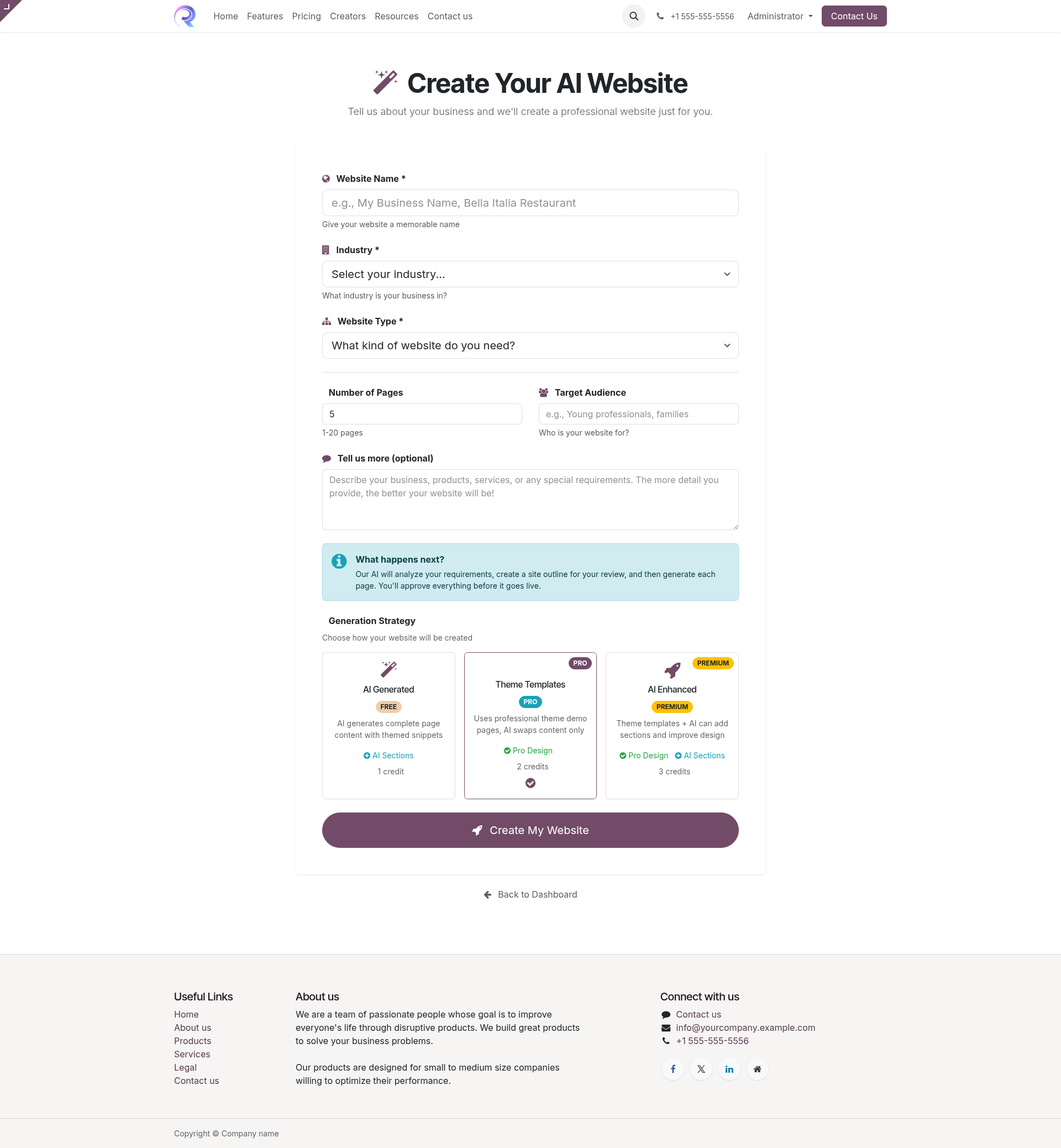
Website creation wizard in the portal
Option 2: Python API
# Create a website project via code
template = env.ref('ai_workflow_website.website_template')

project = env['project.project'].create({
    'name': 'My Company Website',
    'ai_template_id': template.id,
})

# Set project parameters
project.write({
    'ai_params': {
        'industry': 'Technology',
        'website_type': 'corporate',
        'page_count': 5,
        'target_audience': 'B2B decision makers',
        'description': 'Professional website for a SaaS company',
        'company_name': 'TechCorp Inc',
        'theme_style': 'modern',
    }
})

# Start the workflow
project.action_start_workflow()
Stage Breakdown
The website workflow progresses through 9 distinct stages:
Discovery
Captures initial requirements from the wizard or API parameters.
Research
AI analyzes the industry, competitors, and target audience to inform content strategy.
Generate Design Proposal
AI proposes page structure, navigation, color scheme, and content strategy based on research.
Design Review Approval Gate
Human reviews the proposed design and page structure. Can request changes or approve to proceed.
Create Page Tasks
System creates individual tasks for each page to be generated based on the approved design.
Generate Pages
AI generates content and HTML for each page task. Pages are generated sequentially or in parallel depending on configuration.
Page Review Approval Gate
Human reviews each generated page. Can provide feedback for regeneration or approve individual pages.
Publish
Approved pages are published to the website. Navigation menus are created and linked.
Complete
Project is marked complete. Website is live and accessible.
Configuration Options
The following parameters can be set when creating a website project:
| Parameter | Type | Description | Default |
|---|---|---|---|
company_name |
String | Name of the company/organization | Required |
industry |
String | Industry category (e.g., "Technology", "Healthcare") | Required |
website_type |
Selection | "corporate", "portfolio", "ecommerce", "blog", "landing" | "corporate" |
page_count |
Integer | Number of pages to generate (1-10) | 5 |
target_audience |
String | Description of target audience | Optional |
description |
Text | Detailed description of the business/project | Required |
theme_style |
Selection | "modern", "classic", "minimal", "bold" | "modern" |
color_preference |
String | Primary color or color scheme preference | Optional |
Output Details
The website workflow produces the following artifacts:
Website Pages
Fully rendered HTML pages stored in website.page records:
- Homepage with hero section
- About page with company info
- Services/Products pages
- Contact page with form
- Additional pages as configured
Navigation Menu
Automatically created menu structure in website.menu:
- Main navigation menu
- Page links with proper ordering
- Dropdown menus if applicable
- Footer navigation links
Theme Configuration
Applied styling and design tokens:
- Color scheme variables
- Typography settings
- Component styling
- Responsive breakpoints
SEO Metadata
Search engine optimization data:
- Page titles and descriptions
- Open Graph tags
- Structured data (JSON-LD)
- Sitemap entries
API Reference
Model: website.workflow
Extends ai.workflow.contract and ai.content.workflow.mixin
# Key methods available on website workflow projects

# Start workflow execution
project.action_start_workflow()

# Get current stage
current_stage = project.stage_id

# Check if approval is pending
if project.ai_state == 'approval_pending':
    # Show approval wizard
    project.action_open_approval_wizard()

# Approve current stage
project.action_approve_stage()

# Request changes with feedback
project.action_request_changes(feedback="Please make the hero section larger")

# Get all generated pages
pages = project.ai_artifact_ids.filtered(
    lambda a: a.artifact_type == 'website_page'
)

# Get the live website URL
website_url = project.website_url
Testing Tip
Use the website.super.test model to run integration tests
with auto-approval mode enabled:
gen = env['website.super.test'].create({'auto_approve': True, 'run_ai': True})
gen.generate_and_run()