Website Creation Workflow
Complete guide to creating professional multi-page websites using AI-powered generation
Table of Contents
1 Overview
The Website Creation workflow generates professional, multi-page websites tailored to your business or organization. Using advanced AI, it creates cohesive content, layouts, and design elements that match your industry and target audience.
What You Get
- Complete multi-page website (5-15 pages)
- Professional copywriting for all content
- SEO-optimized page titles and meta descriptions
- Responsive design that works on all devices
- Industry-specific content and imagery
- Contact forms and calls-to-action
Timeline
| Initial setup | 5 minutes |
| AI Discovery | 2-5 minutes |
| Design Review | You decide |
| Page Generation | 10-20 minutes |
| Content Review | You decide |
| Total (typical) | 30-60 minutes |
Workflow Stages
✋ = Requires your approval
2 Getting Started
Before You Begin
Have the following information ready to make the process faster:
- Your business/organization name
- Industry or sector
- Target audience description
- Brief description of what you do
- Desired number of pages (5-15 recommended)
How to Access
There are two ways to start creating a website:
Portal (Recommended)
- Log into your account
- Go to My Account
- Click "Create Website" or navigate to
/my/create-website
Backend (Admins)
- Log into the backend
- Go to AI Workflows app
- Click Create and select Website template
3 Creation Wizard
The creation wizard collects all the information needed to generate your website. Fill out each field carefully for best results.
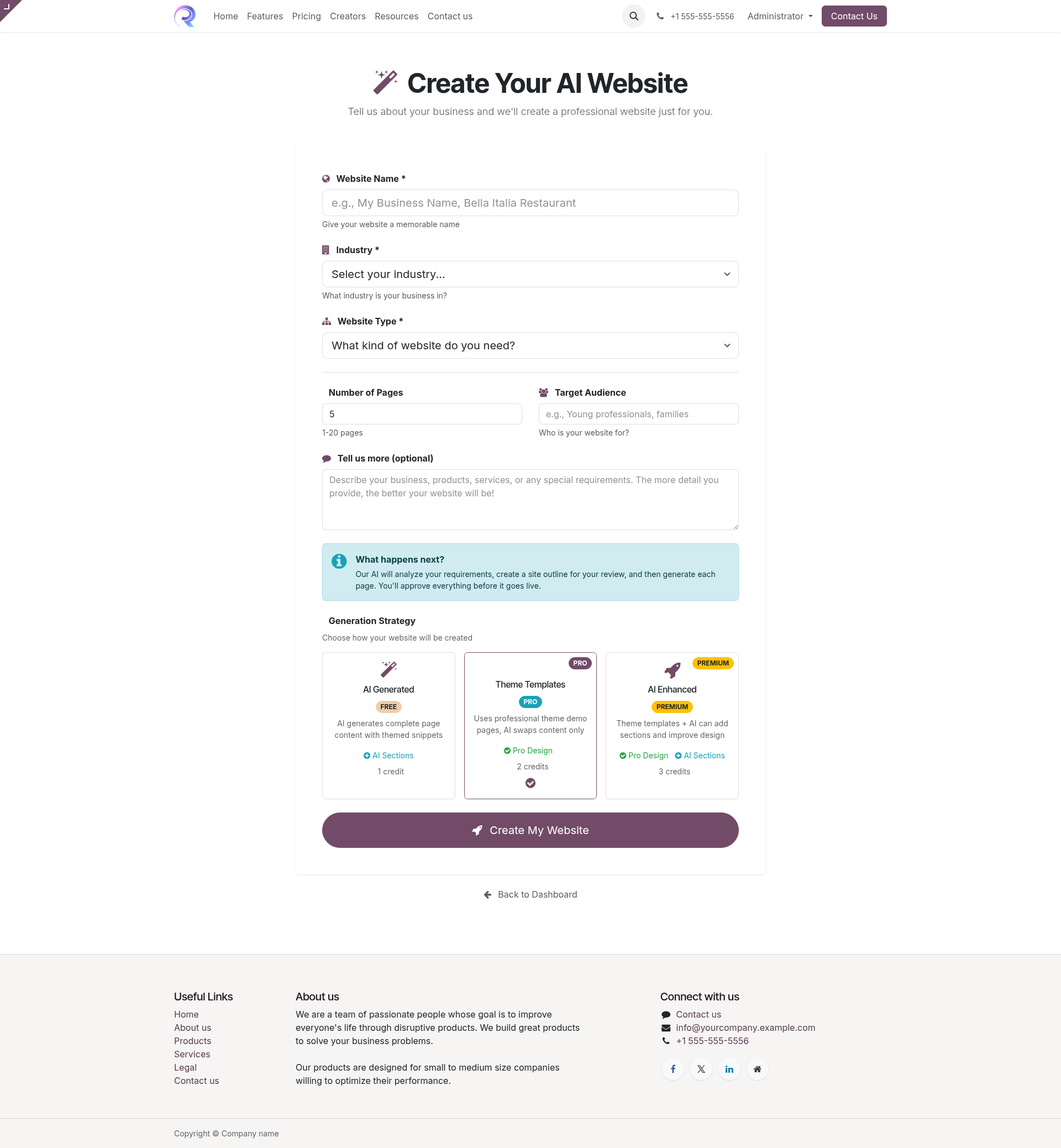
Website Creation Wizard Interface
Form Fields Explained
| Field | Required | Description |
|---|---|---|
| Website Name | Required |
Your business or website name. This appears in the header and throughout the site.
Example: "Bella Italia Restaurant", "TechStart Solutions" |
| Industry | Required | Select your industry category. This helps AI generate relevant content, terminology, and imagery suggestions. |
| Website Type | Required |
The purpose of your website. Options include:
|
| Number of Pages | Optional |
How many pages to generate (default: 5). More pages = more content but longer generation time.
Recommended: 5-8 for small businesses, 10-15 for larger sites |
| Target Audience | Optional |
Who will visit your website? This shapes the tone and content.
Example: "Young professionals ages 25-40", "Small business owners" |
| Description | Optional | Additional details about your business, unique selling points, or specific requirements. The more detail, the better the results. |
Pro Tips
- Be specific in your description - mention key services, products, or differentiators
- Include any specific pages you want (e.g., "include a FAQ page")
- Mention your brand voice if you have one (professional, friendly, technical, etc.)
4 Generation Strategies
Choose how your website will be generated. Each strategy offers different levels of customization and quality.
AI Generated
FREEAI creates complete pages from scratch including layout, sections, and all content.
Best For:
- New businesses without existing brand
- Quick prototypes
- Budget-conscious projects
Features:
- Fully automated
- No template constraints
- Unique layouts
Theme Templates
PROUses professionally designed theme templates. AI fills in content while maintaining design consistency.
Best For:
- Professional appearance required
- Established brand guidelines
- Consistent design across pages
Features:
- Designer templates
- Proven layouts
- Mobile optimized
AI Enhanced
PREMIUMStarts with theme templates, then AI adds custom sections, modifications, and industry-specific enhancements.
Best For:
- Maximum quality required
- Unique competitive edge needed
- Complex business requirements
Features:
- Best of both worlds
- Custom enhancements
- Industry optimization
Stage 1 Discovery
During This Stage
- AI processes your business information
- Researches your industry and competitors
- Determines optimal page structure
- Creates content strategy for each page
- Defines visual design direction
What You Do
Nothing required!
This stage runs automatically. You'll be notified when it's
ready for your review.
Expected Duration
Typically 2-5 minutes depending on complexity and AI provider response time.
Stage 2 Design Review Approval Required
What You'll See
The design review presents:
- Site Structure: List of proposed pages with their purposes
- Content Outline: What each page will contain
- Design Direction: Color scheme, style, and layout approach
- Navigation: How pages connect to each other
Example Site Structure
| Page | Purpose | Key Sections |
|---|---|---|
| Home | Main landing page | Hero, Services Overview, Testimonials, CTA |
| About Us | Company information | Story, Mission, Team, Values |
| Services | What you offer | Service Cards, Pricing, Benefits |
| Contact | Get in touch | Form, Map, Hours, Social Links |
Your Options
Approve
Proceed with this design. Page generation begins.
Request Changes
Provide feedback. AI will revise the design.
Reject
Start over with different inputs.
Tips for Providing Feedback
- Be specific: "Add a FAQ page" rather than "I need more pages"
- Mention what you like so it's preserved
- If requesting changes, explain why (helps AI understand your needs)
Stages 3-5 Page Generation
- Headlines and body copy
- Section layouts and components
- Image placeholders with descriptions
- Call-to-action buttons
- SEO meta information
- Grammar and spelling verification
- Consistency across pages
- SEO optimization check
- Mobile responsiveness validation
Expected Duration
10-20 minutes for a typical 5-page site. Larger sites (10+ pages) may take 30-45 minutes.
Stage 6 Page Review Approval Required
What You'll See
For each page, you can:
- Preview: See how the page looks
- Edit Content: Make direct changes to text
- View Structure: See the sections and components
Review Checklist
Providing Feedback
If changes are needed, be specific:
"I don't like it"
"Make it better"
"This isn't what I wanted"
"Change the hero headline to emphasize speed"
"Add pricing information to services section"
"Make the tone more professional, less casual"
Stages 7-9 Completion
- All links working
- Navigation consistent
- No broken images
- Performance optimization
Your website is ready!
Visit your new website and share it with the world.
10 Troubleshooting
- Large sites (10+ pages) can take 30-45 minutes
- AI provider may be experiencing high demand
- Check your project status in the dashboard
- Contact support if stuck for more than 1 hour
- Request changes in the review stage with specific feedback
- Provide more detail in your initial description
- Make sure you selected the correct industry
- You can edit content directly after generation
- Make sure you're logged into the correct account
- Check My AI Projects
- Projects may take a moment to appear after creation
- Clear your browser cache and refresh
- Check if AI provider is configured correctly (admin)
- Verify API credits are available
- Try again - temporary issues can cause failures
- Contact support with your project ID
Ready to create your website?
Start generating your professional website in minutes
Create Your Website